Containers, Kubernetes & Workload Escape
After this chapter you will be able to escape a container to its node, escape a node to the Kubernetes API server, and reason about why a shared cluster turns one malicious tenant into a cross-account takeover.
You rent a sliver of someone else’s computer to run your app. You never see the machine — you upload a container, and the cloud runs it. The pitch is that your code is sealed in its own little box: it cannot see the host, it cannot see its neighbours, it cannot see anything but itself.
But that box is not a wall. It is a set of instructions to the operating system, telling it to pretend your program is alone. The operating system underneath is the same one running every other customer’s box on that machine. If your program can talk the operating system out of the pretence — or wait for a helpful piece of cloud automation to do it a favour — the box opens, and suddenly you are standing on a computer full of strangers.
The problem
A container is not a small machine. It is an ordinary process that the Linux kernel has been told to lie to. The kernel restricts what the process can see — which other processes, which files, which network interfaces — but the kernel itself is shared by every container on the host. There is no per-tenant kernel and no hypervisor in between. “Container isolation” is a bundle of kernel features applied to a process; isolation holds only as long as every feature is configured, current, and bug-free.
A virtual machine runs its own kernel, and a hypervisor — a thin, heavily-audited layer — arbitrates between guests; escaping one means defeating the hypervisor. A container has no kernel of its own and shares the host’s, so every container on a node is one kernel bug away from every other. That gap is why providers reach for gVisor (a user-space kernel) and Kata Containers (a per-pod micro-VM) when tenants are genuinely hostile.
Cloud providers stack two things on top of plain containers, and both widen the problem. First, they run containers in Kubernetes — you met its managed shape in Chapter 1: the control plane (API server, etcd, schedulers) lives in the provider’s account, and you rent worker nodes underneath it. A container that escapes its sandbox lands on a node; a node that is compromised can reach the API server; the API server governs the whole cluster. Second, providers inject their own software into your cluster — logging agents, monitoring agents, networking installers, security hot-patchers — and that software runs privileged, on every node, and you cannot audit it. The escape path of this chapter is built from exactly those pieces: container → node → cluster → cloud.
Why it matters / how it differs from a traditional pentest
In a customer-side pentest, “container escape” ends at the node: you have rooted one host, you raise a finding, you move on. Against a provider, the node is the start of the interesting part, because the node is rarely the tenant boundary. Container-as-a-Service offerings pack many customers’ containers onto one shared Kubernetes cluster; managed databases and managed bots run as pods on multi-tenant clusters too. The wall the provider sells you is the container, but the wall that actually separates you from other customers is somewhere further up the ladder — the node VM, or the cluster, or nothing at all. Find where the real boundary is and you have found the cross-tenant attack.
The chapter’s thesis through the six-part lens from Chapter 1: the isolation boundary is the kernel and Kubernetes RBAC, not a hypervisor. Identity propagation runs on bearer tokens — pod ServiceAccount JWTs and node credentials — that anyone holding them simply is. The shared components are the host kernel, the multi-tenant cluster, and the provider-injected agents. The provider “magic” — auto-injected DaemonSets, hot-patchers, broker pods that exec on your behalf — is the part you cannot see and therefore the part you should suspect first. And the detection surface is thin: on a managed node you have no process telemetry at all, which is itself the lesson.
The methods at a glance
Every escape in this chapter climbs one level. Each level has its own enforcing mechanism and its own characteristic failure.
| Level | What it crosses | What enforces it | How it breaks |
|---|---|---|---|
| Container → node | The sandbox around your process | Namespaces, cgroups, capabilities, seccomp, the container runtime | A missing capability drop, a stale runc, a writable core_pattern, an exposed runtime socket, or a privileged helper that does the escape for you |
| Node → cluster | The worker VM to the Kubernetes API server | kubelet credentials, RBAC, the NodeRestriction admission controller | Stealing a powerful pod’s bearer token; minting tokens with retained node permissions |
| Cluster → cloud / other tenants | The cluster to the provider account and neighbours | The multi-tenant cluster’s own RBAC; the node’s cloud identity | A shared cluster with one over-privileged broker; a node IAM role that doubles as a cluster identity |
The breakdown sections follow the levels in order: first what holds a container together and how each piece is broken (level 1); then how a rooted node becomes cluster admin (level 2); then two flagship cross-tenant takeovers — Azurescape and GKE Autopilot — and the cloud-account pivot (level 3).
Level 1 — Container → node: breaking the sandbox
“Being in a container” is not one thing. It is the simultaneous application of several independent kernel mechanisms, and the corpus escapes are, almost without exception, cases where one of them was missing, stale, or writable.
Namespaces give a process a private view of one class of resource — processes (PID), filesystem (mount), interfaces (network), hostname, users — so they are a visibility boundary, not a security one; a process able to call setns() can step out. cgroups meter resource use, not access. Capabilities split the old monolithic root into ~40 fragments — a container that keeps CAP_SYS_ADMIN is barely contained at all.
Containment is the combination — namespaces plus dropped capabilities plus seccomp plus cgroups, applied by the runtime. Strip any one and the others leak.
runc is the small binary that performs the namespaced clone() and applies the cgroup, capability, and seccomp settings; containerd (or dockerd) is the daemon that pulls images and drives lifecycle. Both the runtime binary and the daemon’s control socket sit inside the blast radius — an exposed docker.sock lets anything that can reach it launch a privileged host-mounting container.
Four escape primitives recur across the corpus, each abusing a different piece of the sandbox.
| Primitive | What it abuses | How it fails | Corpus illustration |
|---|---|---|---|
| Runtime overwrite | The runc binary itself | A stale runtime carries a public escape CVE (CVE-2019-5736) | Azurescape [1]#054 |
| Exposed runtime socket | docker.sock / containerd.sock | The socket is mounted into a container; ask the daemon for a privileged container | GCP Cloud Shell [8]#046#048, BrokenSesame [7]#084 |
core_pattern hijack | A host-global /proc/sys file | A privileged container writes a |program handler; a crash runs it on the host | BrokenSesame (ApsaraDB) [7]#084 |
| Writable cgroup | cgroup v1 release_agent | A host-side script is designated and runs as root (CVE-2022-0492) | CVE-2022-0492 [11] |
Primitive in focus — the privileged helper that escapes for you
The most instructive escape in the corpus is not a kernel bug at all. AWS’s Log4Shell hot-patch [4]#122 shows that a container can be perfectly configured and still escape — if the provider hands it a way out. To remediate Log4Shell at fleet scale, AWS shipped hot-patchers, including a Kubernetes DaemonSet that ran on every node and scanned for any process whose binary was named java.
A DaemonSet is a Kubernetes controller that runs exactly one copy of a pod on every node — the standard pattern for logging, monitoring, and networking agents. Providers inject DaemonSets the customer never asked for, and they usually run privileged. Ubiquity times privilege times invisibility makes them an ideal target.
To patch a java process inside a container, the hot-patcher had to invoke that container’s java binary. It entered the container’s namespaces with nsenter — but spawned the process as root, with all Linux capabilities, and with no seccomp filter and no cgroup confinement. So a malicious container simply ships its own binary named java. When the node-wide patcher “patches” it, it runs the attacker’s binary with full host-root capabilities.
- Build a container image whose entrypoint is a malicious binary named
java. - Deploy it to any cluster where the hot-patch DaemonSet is installed — no special pod settings needed.
- The node-wide patcher detects the
javaprocess and invokes it inside the container’s namespaces, but with all capabilities, as root, no seccomp, no cgroups. - The attacker binary — now effectively host-root — mounts the host filesystem and installs a systemd unit for a node reverse shell.
The lesson is the chapter’s sharpest: being in a namespace is not being contained. The patcher kept the namespaces and discarded everything else, and that was enough to turn a security feature into a universal escape primitive for every container on the cluster.
Level 2 — Node → cluster: one node, one powerful pod
Root on a node is root on one VM. The leap that matters is from the node to the Kubernetes API server, because the API server governs every node in the cluster. There are two ways up.
A pod’s in-cluster identity is a ServiceAccount; its credential is a signed JWT mounted at /var/run/secrets/kubernetes.io/serviceaccount/token. The token is a bearer credential — whoever holds it is that identity. Modern projected (bound) tokens are audience-scoped and expire with the pod, limiting theft.
The first way: the node’s kubelet holds credentials, and every pod on the node has its ServiceAccount token sitting on the node’s disk. Root on the node reads all of them. The second way is the one to internalise — the powerful pod.
Role-Based Access Control scopes what an identity may do. A powerful pod is one whose ServiceAccount holds a permission that is cluster-admin-equivalent in disguise — update deployments, create pods, or escalate on ClusterRoles. Compromise the node hosting it and you inherit that power.
Why is “update Deployments” equivalent to cluster admin? Because a Deployment names the ServiceAccount its pods run as, and creates the pods. If you can edit a Deployment, you can point it at any ServiceAccount, add your own container, and read that account’s freshly-mounted token. The corpus contains a perfect worked example in GKE’s default add-ons.
kube-system pod’s token, rewrites a Deployment’s serviceAccountName to mount a target token, and pivots to the cluster-role-aggregation controller, which grants itself cluster admin.GKE’s FluentBit logging agent [3]#115 ships as a DaemonSet on every node and mounts the host path /var/lib/kubelet/pods — under which every pod on the node keeps its projected ServiceAccount token. FluentBit needs to read log files; instead it can read every neighbour’s identity. Pair that with Anthos Service Mesh’s installer, whose RBAC stays over-broad after install, and two individually-minor default misconfigurations chain into cluster admin.
- Compromise the FluentBit container on a node — it is a DaemonSet, so this works on any node.
- Read the host-mounted
/var/lib/kubelet/podstree to harvest the ServiceAccount token of every co-located pod. - Use the Anthos Service Mesh installer’s retained RBAC to create a pod in
kube-systembound to a powerful ServiceAccount. - Re-use the token-theft trick to read the
clusterrole-aggregation-controller(CRAC) token; CRAC’s job is editing ClusterRoles, so it grants itself full admin.
Note the final pivot — CRAC, the cluster-role-aggregation controller. Its legitimate job is adding permissions to ClusterRoles, so an attacker holding its token can have it grant itself everything. Keep CRAC in mind: the GKE Autopilot case lands on exactly the same pivot.
Level 3 — Azurescape: cross-account takeover in Azure Container Instances
Azure Container Instances (ACI) is Container-as-a-Service: you upload an image, Azure runs it, you never see a VM. Under the hood ACI ran each customer’s container as a pod on a multi-tenant Kubernetes cluster. The intended tenant boundary was the node VM — one node per customer — but the cluster itself was shared. Azurescape [1]#054 is the first publicly documented cross-account container takeover in a public cloud, and the destination Chapter 1 named.
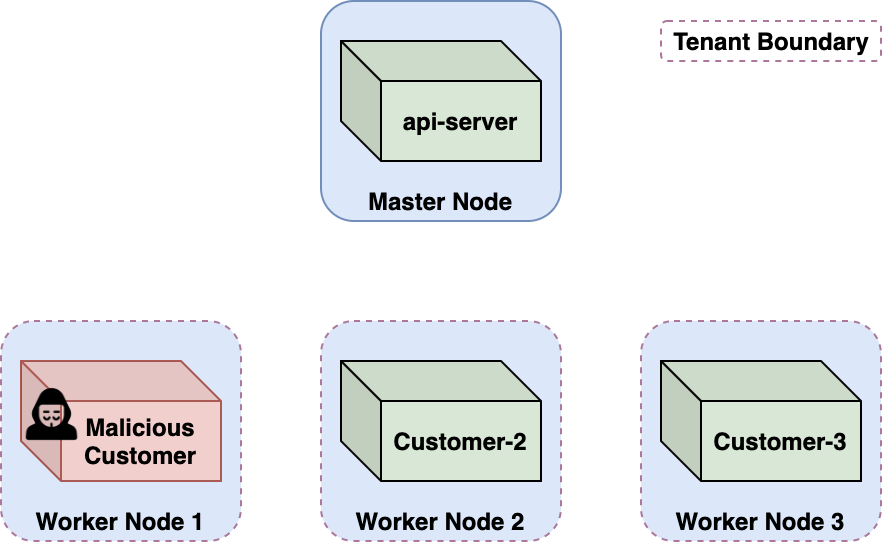
The chain begins with reconnaissance of the runtime. ACI exposes only the container, so to learn what executed their image the researchers built WhoC — an image that reads the host’s container-runtime binary off its own filesystem, exploiting a quiet Linux design quirk (conceptually the inverse of CVE-2019-5736, which overwrites the runtime). WhoC reported runC v1.0.0-rc2, released October 2016 and carrying the well-known runc-overwrite escape, CVE-2019-5736 [10]. Azure was running strangers’ containers on a five-year-stale runtime.
- Deploy a CVE-2019-5736 breakout image to ACI; the escape lands a root reverse shell on the underlying Kubernetes node.
- Recon the node: K8s v1.8–1.10 (2017–2018 vintage), kubelets allowed anonymous access, ~100 customer pods across the cluster.
- ACI handled
az container execthrough a custom broker pod calledbridge;bridgesent exec requests to the node’s kubelet on port10250carrying its own ServiceAccount JWT in theAuthorizationheader. - The compromised node sniffs port
10250, captures thebridgetoken, and decodes it — Kubernetes tokens are unencrypted JWTs. - A
kubectl auth can-iprobe shows thebridgetoken holds cluster-widepods/exec— including on the api-server pod. execinto the api-server container: cluster admin over the multi-tenant cluster, and therefore control of every other ACI customer’s containers.
bridge token, then exec into the api-server pod and cross the dashed-red tenant boundary to every other customer.After Microsoft stopped bridge from sending its token to nodes, the team found a second, independent route. The bridge pod builds its kubelet exec URL from the pod’s status.hostIP field — a field the node itself is authorized to write — and the API server never validated that it was actually an IP. Setting status.hostIP to a crafted string ending in # turns the rest of the broker-constructed URL into a URI fragment, redirecting an az container exec to the api-server’s own kubelet. Same impact, fresh bug.
A field a component is legitimately allowed to write — here a node writing its own status.hostIP — is part of the attack surface. Treating “authorized writer” as “trusted input” is how the second Azurescape route owned the cluster. We revisit Azurescape in Chapter 11 to classify it by failed boundary.
Level 3 — GKE Autopilot: container escape to shadow admin
GKE Autopilot is the most hands-off managed Kubernetes: Google runs the nodes and the customer is not supposed to touch them. The Autopilot case [2]#121 shows provider policy becoming a new attack surface — and a node-to-admin pivot that works on ordinary GKE too.
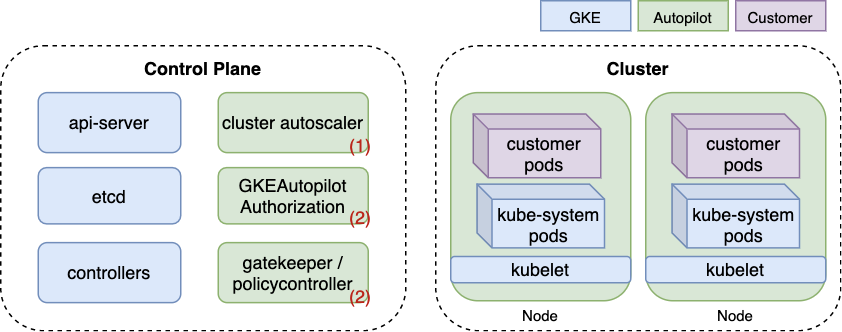
kube-system pods on the nodes, and Autopilot’s policy components (Gatekeeper, the GKEAutopilot authorizer, the autoscaler). Source: [2]#121Autopilot blocks privileged containers with OPA Gatekeeper and a proprietary authorizer — but it ships an allowlistedworkloads mechanism, and the sole allow-listed workload at the time, the Datadog agent, was identified only by its container command and image. A pod that copies that command and image, but runs attacker code, inherits the same host mounts — including the containerd socket.
- Deploy a pod that masquerades as the allow-listed Datadog agent — same
commandandimage— so Autopilot permits the privileged host mounts. - Use the mounted
containerdsocket to launch a host-filesystem container and get a node reverse shell. - Pin the breakout pod to the node hosting a target system pod using the plain
nodeNamefield (Autopilot blocksnodeSelectorbut allowsnodeName); trigger the autoscaler if there is no room. - Autopilot exempts
kube-systemServiceAccounts from its policy; default podsmetrics-serverandstackdriver-metadata-agentcanupdateDeployments. - Rewrite a Deployment’s
serviceAccountNameto the CRAC ServiceAccount, add a container, read CRAC’s token — CRAC grants itself cluster admin. This pivot works on GKE Standard too. - Install a mutating admission webhook for invisible persistence: it rewrites every created object, and Autopilot admins could not even list webhooks — a true shadow admin.
Two things make this more than a GKE bug. First, the allow-listed-workload check trusted a spoofable fingerprint — provider “magic” that a tenant can imitate. Second, the node-to-admin pivot is the same powerful pod → CRAC pattern as the FluentBit chain, which means it is a property of how default kube-system add-ons are permissioned, not of Autopilot specifically.
Level 3 — Cluster → cloud: the node identity pivot
The last rung leaves Kubernetes entirely. In managed Kubernetes the worker node is a cloud VM with a cloud identity, and that identity is frequently the skeleton key. The cleanest illustration is Amazon EKS [5]#164, where the node’s IAM role is also a cluster identity.
system:nodes — to the EKS API server. The pivot crosses two dashed-red boundaries.EKS authentication is IAM-backed: aws eks get-token produces a pre-signed sts:GetCallerIdentity URL that the control plane resolves to an IAM identity and maps to RBAC. A pod with an SSRF can reach the worker node’s metadata service at 169.254.169.254 (the Chapter 4 primitive) and lift the node’s IAM role credentials. Those credentials authenticate to AWS — and, by design, to the EKS API server as the system:nodes group.
- From a pod, use SSRF to read the worker node’s IMDS and pull the
NodeInstanceRolecredentials. - Authenticate to the EKS API server as
system:nodes; theNodeRestrictionadmission controller constrains it, but it retainscreate serviceaccounts/token. - Mint a token for any pod on that node — pick one whose ServiceAccount is cluster-admin — and take over the cluster.
- Alternatively mint a token with
--audience=sts.amazonaws.comand exchange it viasts:AssumeRoleWithWebIdentityfor that pod’s IRSA role — pivoting into the AWS account itself.
The blast radius depends on what runs in the cluster. Operators that bridge cluster and cloud — External Secrets, Crossplane, AWS Controllers for Kubernetes — often run with AdministratorAccess; stealing such a pod’s identity is AWS account admin. The defensive instinct is to block 169.254.169.254 with a network policy and enforce IMDSv2, which treats the symptom. The disease is that a pod can reach node credentials at all. GKE has the mirror-image flaw: reading the kube-env metadata attribute yields the kubelet’s bootstrap key, which the CSR API upgrades to a cluster-admin certificate [13]#030.
The pattern generalises beyond Kubernetes
Managed databases run on multi-tenant clusters too. Hell’s Keychain [6]#076 began with a PostgreSQL flaw in IBM Cloud and landed RCE on what turned out to be a Kubernetes pod (KUBERNETES_PORT in the environment gave it away); from the pod’s ServiceAccount token the researchers read an imagePullSecret, decoded four internal container-registry credentials, and — combined with unexpected network reach to build servers — could overwrite images baked into every PostgreSQL instance. BrokenSesame [7]#084 did the same in Alibaba Cloud, escaping via a shared PID namespace and core_pattern, then finding an imagePullSecret with registry push rights. The PostgreSQL engine detail belongs to Chapter 8; the lesson here is to see “managed service X” and immediately ask whether X is a pod.
It generalises past containers, too. Azure Health Bot [9]#261 ran customer JavaScript in a vm2 language sandbox; an escape gave RCE on a backend shared across customers, and reading uninitialised process memory leaked other tenants’ secrets. Microsoft’s fix is the teachable moment: a separate ACI instance per customer, moving the boundary from a shared language sandbox to a per-tenant container. The counter-example is FabricScape [12]#066: a Service Fabric escape that worked on the self-managed product but failed against Azure’s managed multi-tenant offering, because the managed variant disabled container-runtime access — proof the hardening is possible when the provider chooses to do it.
- Fingerprint the runtime from inside the container — a WhoC-style read reveals a stale
runcwith a public escape CVE. - Inventory the sandbox: capability set, seccomp, mounted sockets (
docker.sock), writable/proc/sys(core_pattern), shared PID namespace, mountable cgroup hierarchies. - Look for provider-injected DaemonSets — hot-patchers, logging agents, CNI installers — that may escape for you or expose neighbours’ tokens.
- On a node, read every pod’s ServiceAccount token under the kubelet pods directory and decode each JWT.
- Run
kubectl auth can-i --listper token; hunt powerful pods —update deployments,create pods,escalate— and pivot through CRAC. - From a pod, probe the node’s metadata service for node credentials; on EKS check
system:nodestoken-minting and IRSA exchange. - Ask whether the cluster is multi-tenant — if a broker pod or the API server is shared, one node compromise crosses the tenant boundary.
- Patch runtimes and kernels aggressively; never run customer workloads on a stale managed component — Azurescape’s
runcwas five years old. - Never send a privileged ServiceAccount token anywhere but the API server; validate every node-writable field (
status.hostIP) as untrusted input. - Use bound, audience-scoped projected tokens; keep the
NodeRestrictionadmission controller on; firewall node-to-node traffic. - Audit powerful pods — map pod → ServiceAccount → RBAC — and isolate them from untrusted workloads with taints and affinity.
- Scope provider-injected DaemonSet and agent permissions to the minimum; an installer should lose its install RBAC once it is done.
- Block pod access to
169.254.169.254with a network policy and enforce IMDSv2 with a hop limit of 1; least-privilege the node’s cloud identity; make registry pull secrets pull-only. - Reach for gVisor or Kata Containers for genuinely hostile multi-tenant workloads.
- Alert on
can-ienumeration,execinto system pods, DeploymentserviceAccountNamemutations by system accounts, and new mutating admission webhooks — and recognise that on a managed node the customer often has no process telemetry at all.
- A container is a process, not a machine; the kernel below it is shared, and being in a namespace is not being contained.
- Containment is the combination of namespaces, dropped capabilities, seccomp, and cgroups — strip one and the others leak.
- The provider’s helpful automation — hot-patchers, logging DaemonSets, broker pods — runs privileged and unauditable, and is the first thing to suspect.
- Kubernetes identity is bearer tokens; a powerful pod turns one node compromise into cluster admin, often via the cluster-role-aggregation controller.
- The node is rarely the tenant boundary — a shared cluster or a node cloud identity carries the takeover across accounts, as Azurescape proved first.
References
- Yuval Avrahami, Unit 42 (Palo Alto Networks), “Finding Azurescape — Cross-Account Container Takeover in Azure Container Instances.” Archived: local copy · Original: unit42.paloaltonetworks.com. Corpus #054.
- Yuval Avrahami, Unit 42 (Palo Alto Networks), “GKE Autopilot: Container Escape to Shadow Admin.” Archived: local copy · Original: unit42.paloaltonetworks.com. Corpus #121.
- Shaul Ben Hai, Unit 42 (Palo Alto Networks), “Dual Privilege Escalation Chain in GKE via FluentBit and Anthos Service Mesh.” Archived: local copy · Original: unit42.paloaltonetworks.com. Corpus #115.
- Yuval Avrahami, Unit 42 (Palo Alto Networks), “AWS’s Log4Shell Hot Patch Vulnerable to Container Escape” (CVE-2021-3100, CVE-2021-3101, CVE-2022-0070, CVE-2022-0071). Archived: local copy · Original: unit42.paloaltonetworks.com. Corpus #122.
- Christophe Tafani-Dereeper, Datadog Security Labs, “Attacking and securing cloud identities in managed Kubernetes: Amazon EKS.” Archived: local copy · Original: securitylabs.datadoghq.com. Corpus #164.
- Wiz Research, “Hell’s Keychain — supply-chain attack in IBM Cloud Databases for PostgreSQL.” Archived: local copy · Original: wiz.io. Corpus #076.
- Wiz Research, “#BrokenSesame — cross-tenant database access in Alibaba Cloud ApsaraDB & AnalyticDB for PostgreSQL.” Archived: local copy · Original: wiz.io. Corpus #084.
- Offensi (Wouter ter Maat), “GCP Cloud Shell vulnerabilities — escaping the Cloud Shell container.” Archived: local copy · Original: offensi.com. Corpus #046 / #048.
- Yanir Tsarimi, Breachproof, “Lethal Injection — how we hacked Microsoft’s AI chat bot (Azure Health Bot).” Archived: local copy (metadata only) · Original: breachproof.net · entry: cloudvulndb.org. Corpus #261.
- Aleksa Sarai et al., “CVE-2019-5736: runc container breakout via overwrite of host runc binary.” Original: nvd.nist.gov. Public advisory (no local archive).
- Yuval Avrahami, Unit 42 (Palo Alto Networks), “CVE-2022-0492: privilege escalation and container escape via the cgroups v1 release_agent.” Original: unit42.paloaltonetworks.com. Public research (no local archive).
- Aviv Sasson, Unit 42 (Palo Alto Networks), “FabricScape — escaping Azure Service Fabric containers (CVE-2022-30137).” Archived: local copy · Original: unit42.paloaltonetworks.com. Corpus #066.
- Rhino Security Labs, “Privilege escalation in GKE via the Kubernetes TLS-bootstrapping mechanism.” Archived: local copy · Original: rhinosecuritylabs.com. Corpus #030.